


FlightView: Flight Tracker
1.54.07K Reviews
App Specs
- Version
- 5.0.13
- Updated On
- License
- Free
- Downloads
- 1,000,000+
- Developer
- OAG Aviation Worldwide Limited
- Categories
- Travel & Local
- Platform
- Android
Screenshots



 Analysis by AppCompare
I find a flight tracker most useful when it answers one practical question quickly: has the plane’s situation changed, and what should I do next? That is the lens I use with FlightView: Flight Tracker. Rather than replacing an airline’s booking tools or an airport’s signs, it gives me a way to follow a flight’s progress and check its status without refreshing several different pages. For travelers coordinating a pickup, watching a connection, or trying to stay calm while plans shift, that focus can make a stressful day easier to manage.
A moving map is useful when timing matters
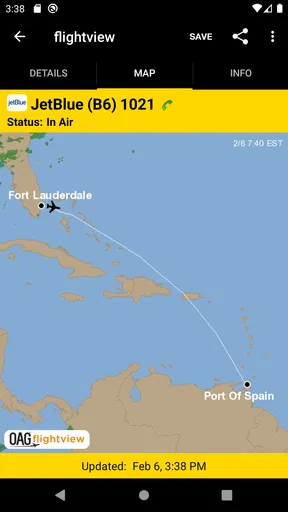
The capability that stands out to me is live flight tracking on a map. A status line can tell me that a flight is underway, but seeing its progress gives the information a more practical shape: I can follow the journey and get a sense of whether the plane is still in transit rather than relying on a vague guess. The map is especially helpful when someone else is flying and I need to decide when to leave for the airport.
It is worth treating the map as a planning aid, not as a promise about the exact moment a plane will reach the gate. Air travel has several stages between being airborne and a passenger walking out of the terminal. I use the tracker to understand the broad progress of a trip, then keep an eye on the arrival status as the landing gets closer. That distinction helps avoid the classic mistake of heading to the curb as soon as a plane appears near its destination.
Searching and following a flight
FlightView lets me look up a flight by its number or by its route. If I have the flight number from a text or itinerary, that is the direct route to the right result. Searching by route is handy when I am helping someone who has sent only their cities, though I still check the flight details carefully before relying on the result. Routes can have more than one service, and matching the correct flight is a small step that prevents a large confusion.
Once I have found the flight, I can use its status and map together rather than treating either as the whole story. For a traveler, that means checking before leaving home and again when plans might have changed. For the person picking them up, it means following progress from a distance and making a more informed call about when to start driving. I would still keep the airline’s own updates available for decisions that affect check-in, boarding, or changes to a booking.
Small workflow choices that make it more useful
My most useful habit is to look up the flight as soon as I have a confirmed flight number, rather than waiting until I am already on the way to the airport. That gives me a reference point for later checks and reduces the chance of searching in a hurry. When I am tracking a family member, I ask them to send the exact flight number instead of relying on a city pair alone; it is a simple way to avoid confusing similar routes.
For an airport pickup, I would check the map while the flight is in the air, then shift attention to the arrival status as the aircraft approaches. That is more helpful than watching the map continuously, and it leaves room to respond if the timing changes. If I am the passenger, I treat tracking as a supplement to my own itinerary: the app can help me understand the flight’s progress, but it should not become my only source for gate or boarding decisions.
Worth Reading Before You Choose

EA SPORTS FC Mobile 26 Is a Bigger Football Game, but It Takes Time

Flipboard Shows What News Apps Must Do Beyond the Feed

Switching to Android Auto Means Rethinking Your Driving Routine

Google Calendar Makes a Crowded Week Easier to Manage

Ludo King Makes the Most of the Minutes Between Plans

Baby Panda World Brings Quick Play to Modern Phones, but Its Game Library Feels Busy
Where it fits among travel tools
FlightView is a travel and local app from OAG Aviation Worldwide Limited. It is free to install, with optional in-app purchases, and is rated for Everyone. It has been available since July 23, 2010, and its current version is 5.0.13, with Android 7.0 as the minimum listed operating system. Its average rating is 1.5 from around 12,000 ratings, while it has over 1 million installs. Those figures make me cautious about recommending it as a flawless essential; I would try it on a low-stakes flight before depending on it during a complicated trip.
Compared with checking an airline app, FlightView’s appeal is the dedicated tracking view: I can focus on flight progress instead of navigating booking and account tools. An airline app remains the better place to handle reservations and passenger-specific instructions. Airport departure boards are useful once I am inside a terminal, but they are less convenient when I am at home or coordinating a pickup. I see FlightView as a focused companion between those options, not a replacement for either one.
Who benefits, and where I would be careful
The best fit is someone who regularly checks flights for other people, coordinates airport rides, or wants a quick overview of a journey while away from the terminal. It can also help an occasional traveler who feels more settled when they can follow a flight visually. If you only need to check your own booking, rarely travel, or prefer to keep every travel task inside one airline app, installing a separate tracker may add little value.
There are trade-offs. A map is engaging, but it does not remove the uncertainty that comes with delays, airport procedures, or last-minute operational changes. I would avoid making an expensive or time-critical decision based only on a tracker’s picture of a flight. I also would not assume that every useful detail is equally convenient to reach in every situation; when time is tight, a direct search by flight number is more dependable than browsing around.
Keeping Tabs on Flights Made Easy
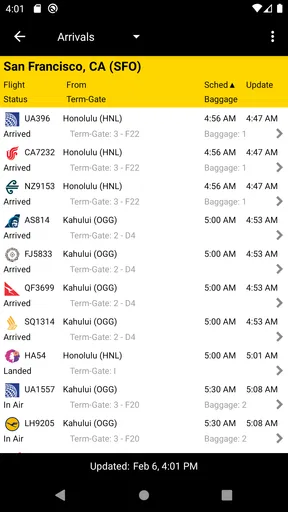
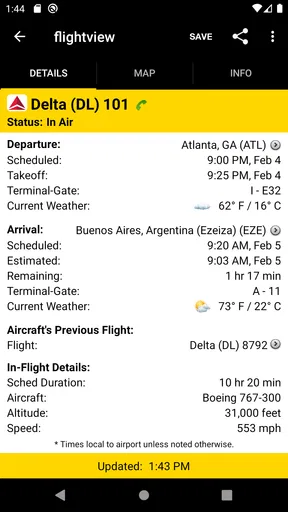
So, what’s the deal with FlightView: Flight Tracker? At its core, this app is all about providing real-time flight status updates. As soon as I launched it, I was greeted by a clean, intuitive interface that made navigating through options a breeze. You can quickly search for flights by entering either the flight number or the route. I found it super handy, especially when trying to track multiple flights at once.
One of the standout features is the live map tracking. It’s almost like having your own personal radar! You can watch the plane’s progress mid-air, which is not only informative but also kinda fun. Plus, it gives you a visual representation of the flight path, so you get a sense of where your plane is in the world.
Alerts and Notifications
Let’s talk about notifications, because this is where FlightView really shines. You can set up alerts for changes in departure and arrival times, gate changes, or delays. The app sends these updates straight to your phone, so you’re always in the loop without having to constantly check manually. This feature was a lifesaver when I was juggling multiple layovers and needed to stay on top of things.
For a practical routine, I’d enable only the alerts that help me act: a change to departure timing before I leave, or an arrival update when someone is on the way. That keeps a busy phone from turning every small status change into a distraction. If I am the passenger, I still check the airport display and airline messages before boarding; a notification is a useful prompt, but the gate area is where I confirm what to do next.
Weather? Covered!
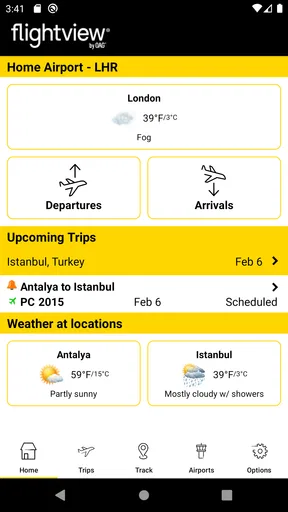
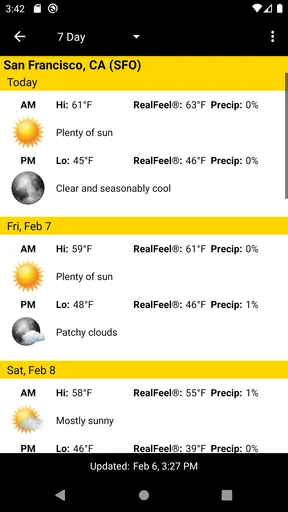
Another neat feature is the weather updates. The app provides detailed weather forecasts for departure and arrival cities. I found this incredibly useful for planning what to pack or just preparing for any travel disruptions due to bad weather. It’s like having a mini weather station in your pocket!
For a trip involving a weather-sensitive connection, I find it useful to check the departure and arrival cities as separate places rather than assuming conditions are the same across the whole journey. A forecast can help me anticipate a messy travel day, but it cannot tell me whether a particular flight will be delayed or how an airline will handle a disruption. I use it to prepare mentally and practically, not to make a firm prediction.
Organizing Your Travel
If you’re someone who loves being organized (like me), you’ll appreciate the trip planning functionality. You can save all your upcoming flights in one place, making it easy to keep track of your itinerary. Plus, it syncs with your calendar, which takes a lot of the hassle out of planning. No more scribbling down flight numbers or hunting for confirmation emails!
That kind of saved overview is most valuable when a trip has several legs or when I am keeping tabs on more than one person. I would still keep the airline confirmation somewhere easy to reach: a saved tracker entry is convenient for monitoring, while the booking details are what I want close at hand if I need to manage the trip itself. Separating those jobs makes the app’s role clearer and avoids expecting a tracker to serve as a complete travel wallet.
User Experience and Design
The overall user experience is smooth and straightforward. The app isn’t bogged down with unnecessary features, which means it’s fast and responsive. I also love the clean design—everything is where you’d expect it to be, and the color scheme is easy on the eyes. The developers clearly focused on user-friendly navigation, which is always a win in my book.
Still, a clean interface matters most when it helps me get to the flight I need without fuss. I would use the route search as a starting point only when the flight number is unavailable, then verify the result before saving or following it. That extra check is worthwhile if I am tracking a relative’s trip or coordinating a ride, where acting on the wrong flight could waste time even if the app itself is easy to navigate.
And can we talk about the app’s performance? I didn’t experience any lag or crashes, which is crucial when you’re relying on an app for timely updates. It’s clear that FlightView is built to handle the demands of regular use.
For me, the most sensible test is a straightforward journey: look up a flight, save it, and see whether the information is easy to find again when I need it. That gives a new user a chance to learn the layout before relying on it during a connection or pickup. Because the app has optional purchases priced from $1.99 to $17.99 per item, I would first decide whether its basic tracking routine meets my needs rather than paying for anything before I know how I use it.
Final Thoughts
All in all, FlightView: Flight Tracker is a solid choice for anyone looking to keep tabs on flights. It’s packed with features that cater to both casual travelers and frequent flyers, making it a versatile tool for getting through the sometimes chaotic world of air travel. With its real-time updates, weather forecasts, and easy-to-use interface, it’s become an indispensable part of my travel routine.
If you’re tired of the airport guessing games, give this app a whirl. It might just make your next trip a whole lot smoother. Happy travels!
Pros
- Real-time flight status updates.
- User-friendly interface for easy navigation.
- Customizable alerts for flight changes.
- Comprehensive airport and terminal info.
- Offline access to saved flight data.
Cons
- Limited features in free version.
- Occasional inaccuracies in flight data.
- Ads can be intrusive for free users.
- No integration with ride-sharing apps.
- Lacks detailed weather information.
FAQs for FlightView: Flight Tracker
What features does FlightView: Flight Tracker offer?
FlightView: Flight Tracker provides real-time flight status updates, airport delay information, and gate change notifications. Users can track flights on a map, receive weather updates for departure and arrival cities, and access a flight schedule for upcoming trips. The app also allows users to save flights to a personal account for easy tracking.
Is FlightView: Flight Tracker available for both Android and iOS?
Yes, FlightView: Flight Tracker is available for download on both Android and iOS platforms. Users can find the app on the Google Play Store for Android devices and the Apple App Store for iOS devices. Both versions offer a similar set of features and a user-friendly interface.
Does FlightView: Flight Tracker require an internet connection to function?
Yes, FlightView: Flight Tracker requires an active internet connection to provide real-time updates and accurate flight tracking. Users need a stable Wi-Fi or mobile data connection to access current flight information, receive notifications, and check airport conditions. Offline use is limited to previously downloaded data.
Is there a cost associated with using FlightView: Flight Tracker?
FlightView: Flight Tracker offers a free version with essential features suitable for most users. However, there is also a premium version available for purchase, which provides additional features such as ad-free experience, more detailed maps, and enhanced flight tracking capabilities for frequent travelers.
How accurate is the flight information provided by FlightView: Flight Tracker?
FlightView: Flight Tracker is known for its accuracy and reliability. The app sources real-time data from airlines and airport systems, ensuring users receive up-to-date and precise flight information. However, users should be aware that sudden changes, like weather disruptions, may affect real-time updates.


